Sony MDS-JB940: Pure, Uncut, High-End MiniDisc
by CoryW
One of my favorite parts of doing these MiniDisc reviews so far has been gathering up cultural clues and contexts surrounding the machines in question. I love seeing some of the why behind how the machines are the way they are.
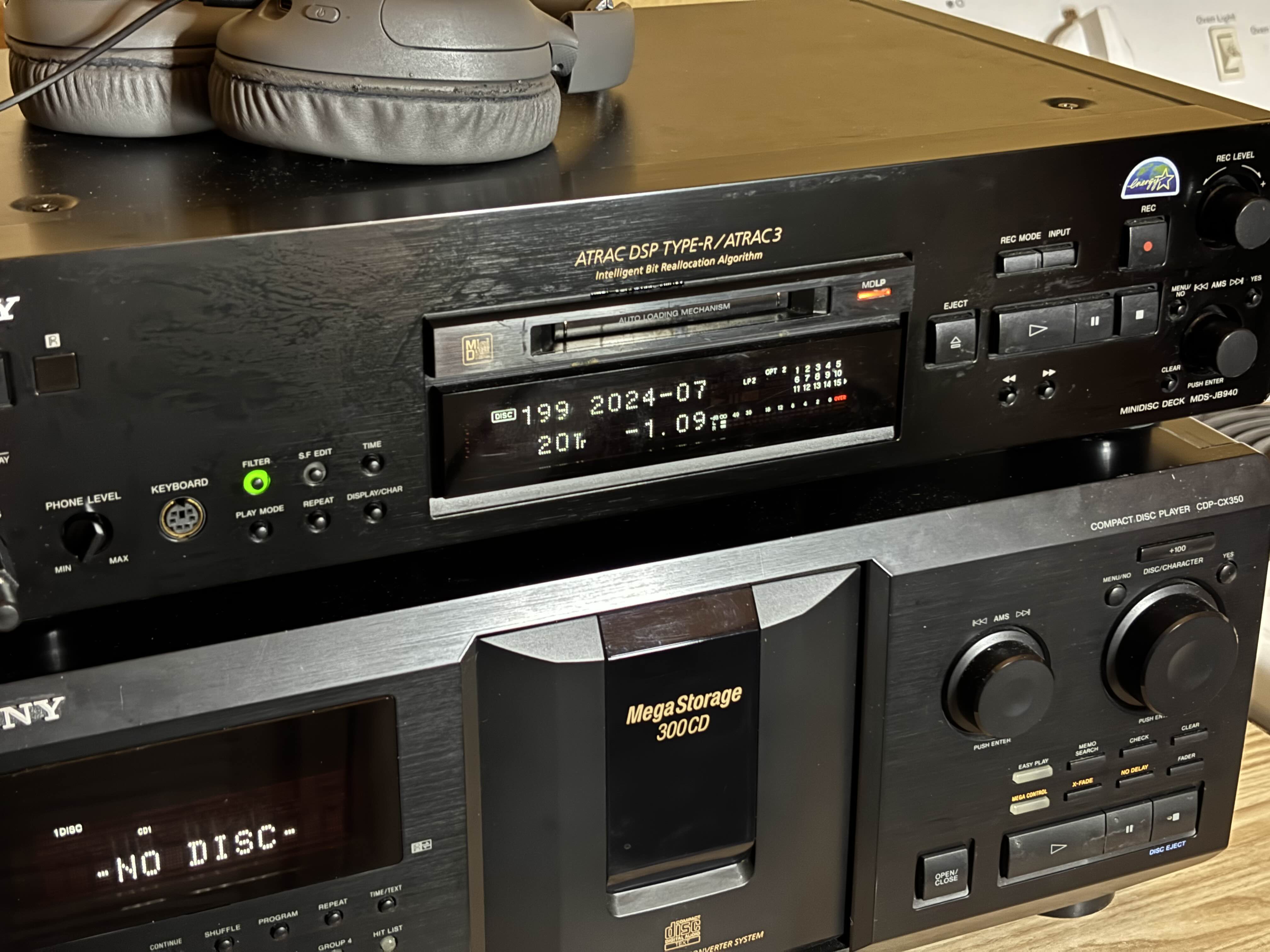
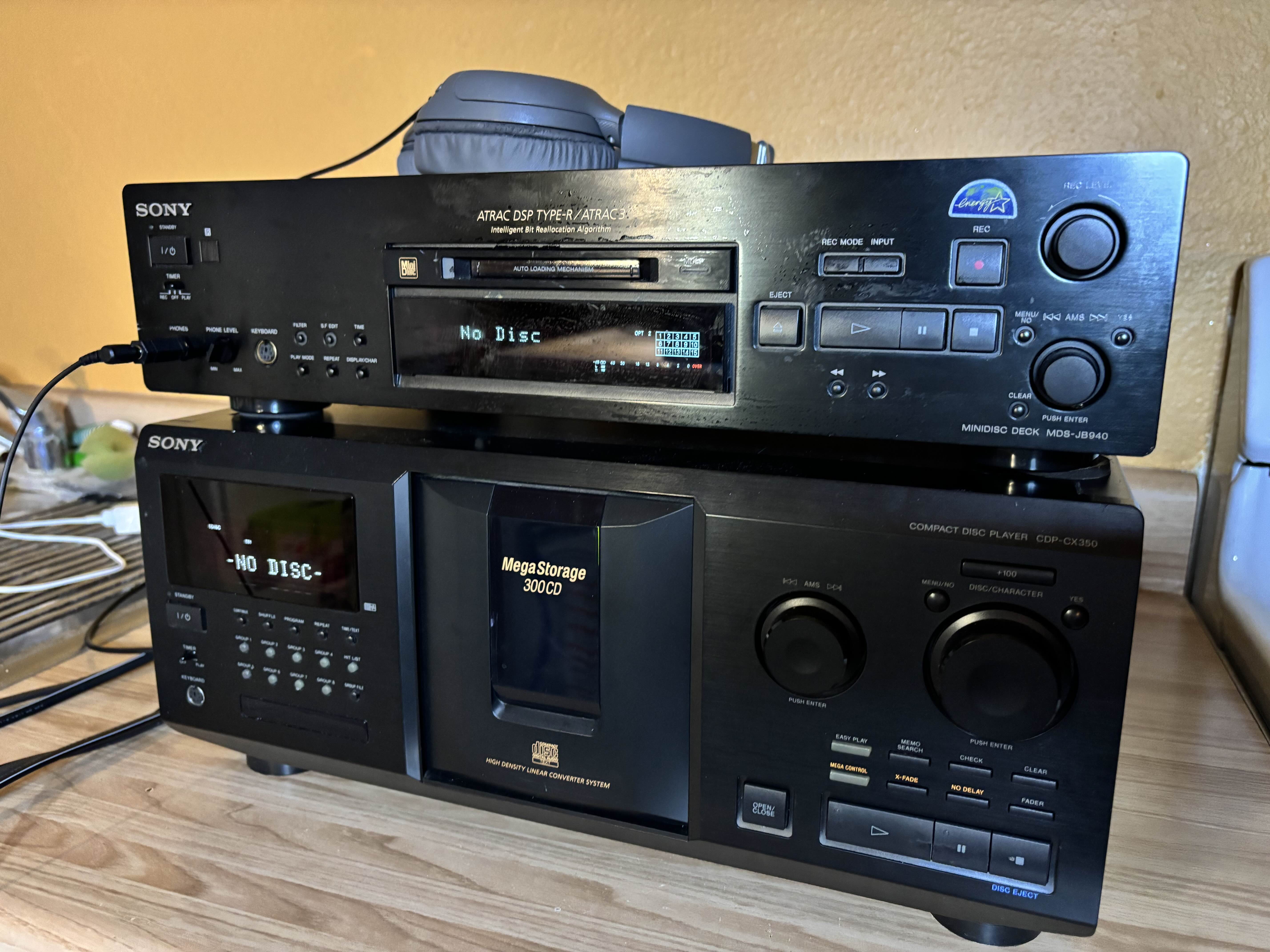
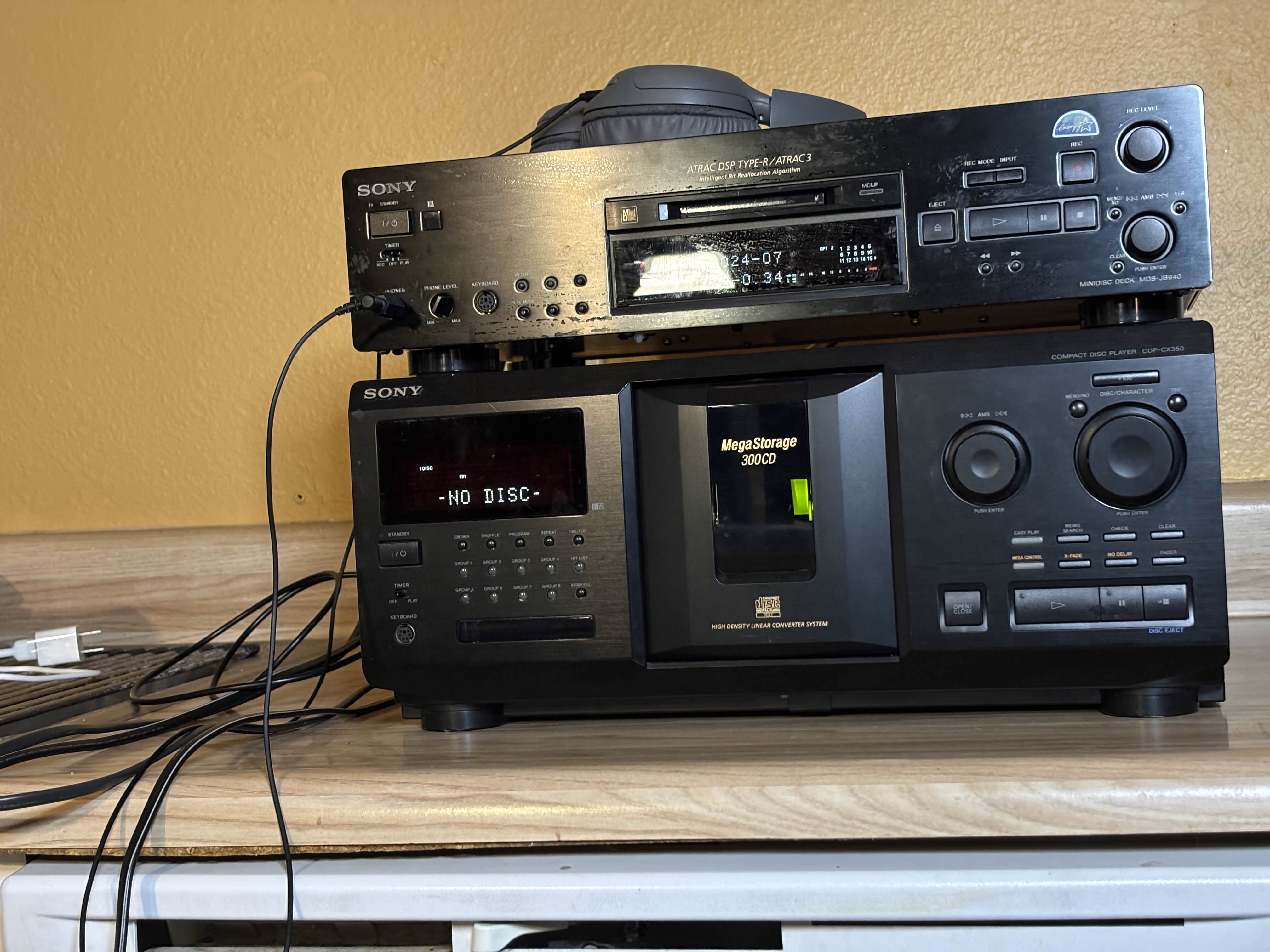
As a side-note: I apologize for the pictures on this one. I had to pick the least bad time during a bad year to get the least-bad pictures I could. Unfortunately, you can't take your 300-disc CD player and full sized minidisc deck to the local Taco Bell and ask them to let you do a mini photo shoot. I tried for the least-bad pictures I could get to illustrate the machine.
Welcome
I've loved talking about the overall contours of the format when explaining and rebuffing the MZ-RH1, explaining American use of the format when examining the R700 and describing the computer kit (even though I didn't use the kit as part of my review) and loved examining the Japaneseness* of the Panasonic SJ-MR100 with it's train mode and the SJ-MR230, which cost-reduces out NetMD and implies some use cases only possible under Japan's different copyright laws.
What's up next then?
The Sony MDS-JB940, of course.
I've wanted to do a deck for a while. Shortly after getting my MZ-R700, I picked up an MZ-NE410 and an MDS-S500 and it was shortly after this I decided I wanted to get my hands on as many different "experiences" with the format as possible.
If I'm honest, I'd kind of wanted to review the MXD-D5C, but mine's out of MD drive is currently showing errors. Fortunately, over the summer I helped a friend install a new belt in an MDS-E12 and he gave me the spare, which slotted right in on my JB940, bringing it from project to my new primary work computer machine, and CD recording workhorse.
My other primary also-fully-working home deck is an MDS-JA333ES, but my focus drew in on the JB940 because it's got a couple niceties for recording and editing compared to the JA333ES, whose primary upgrade is in improved analog hardware.
The JB940
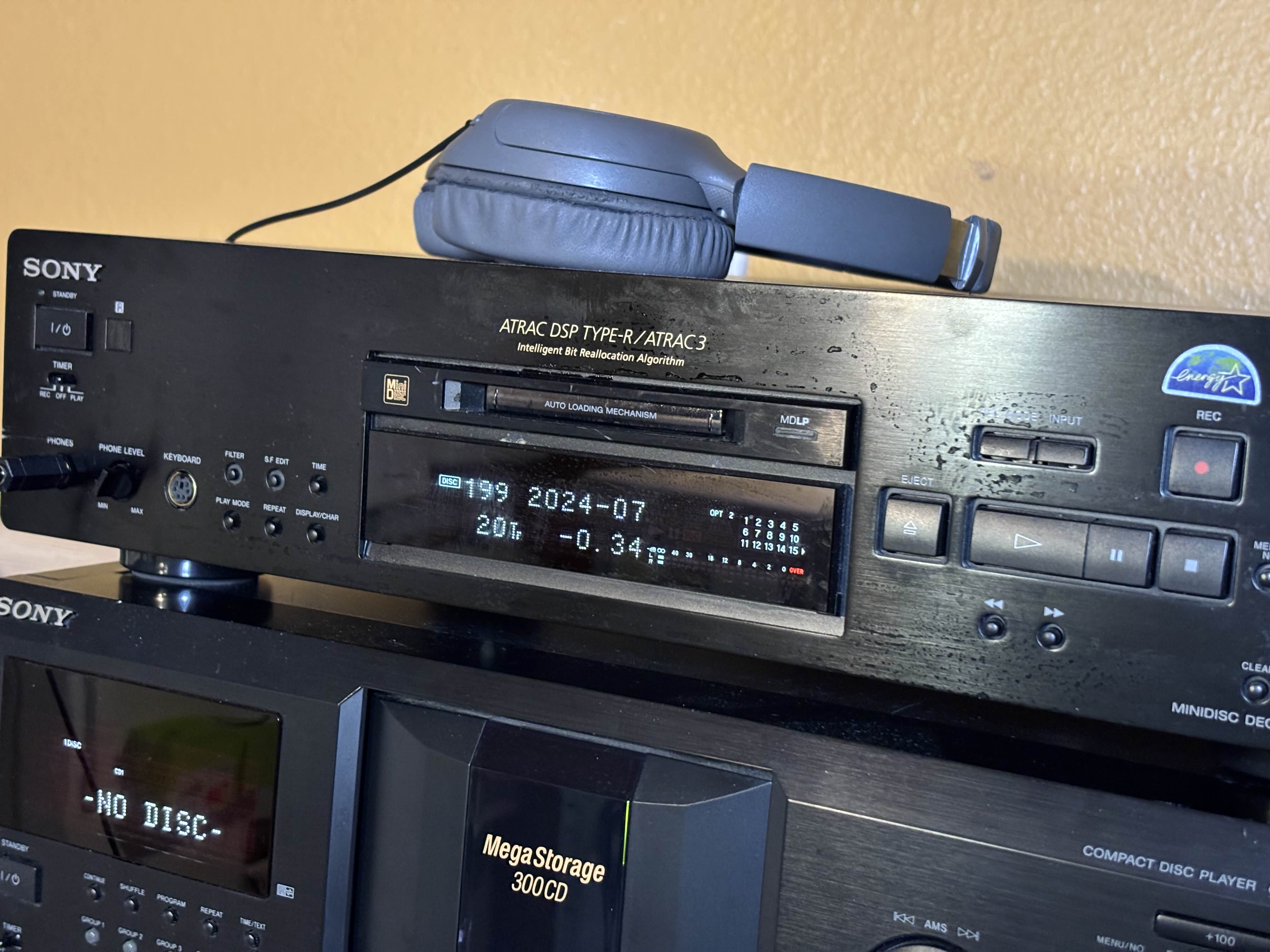
The MDS-JB940 is, as mentioned a home hifi "separates" minidisc deck. It was announced in July 2000 alongside a furry of other updated machines for the new MDLP codec, for a release in September the same year.
Up from the lower end and midrange models, the JB940 has more input and output flexibility, upgraded power supply, dedicated controls for more editing and playback functions, output filters for the analog output, pitch/speed control, faders for recording and playback, timestamping, and an option to output a 24-bit digital signal.
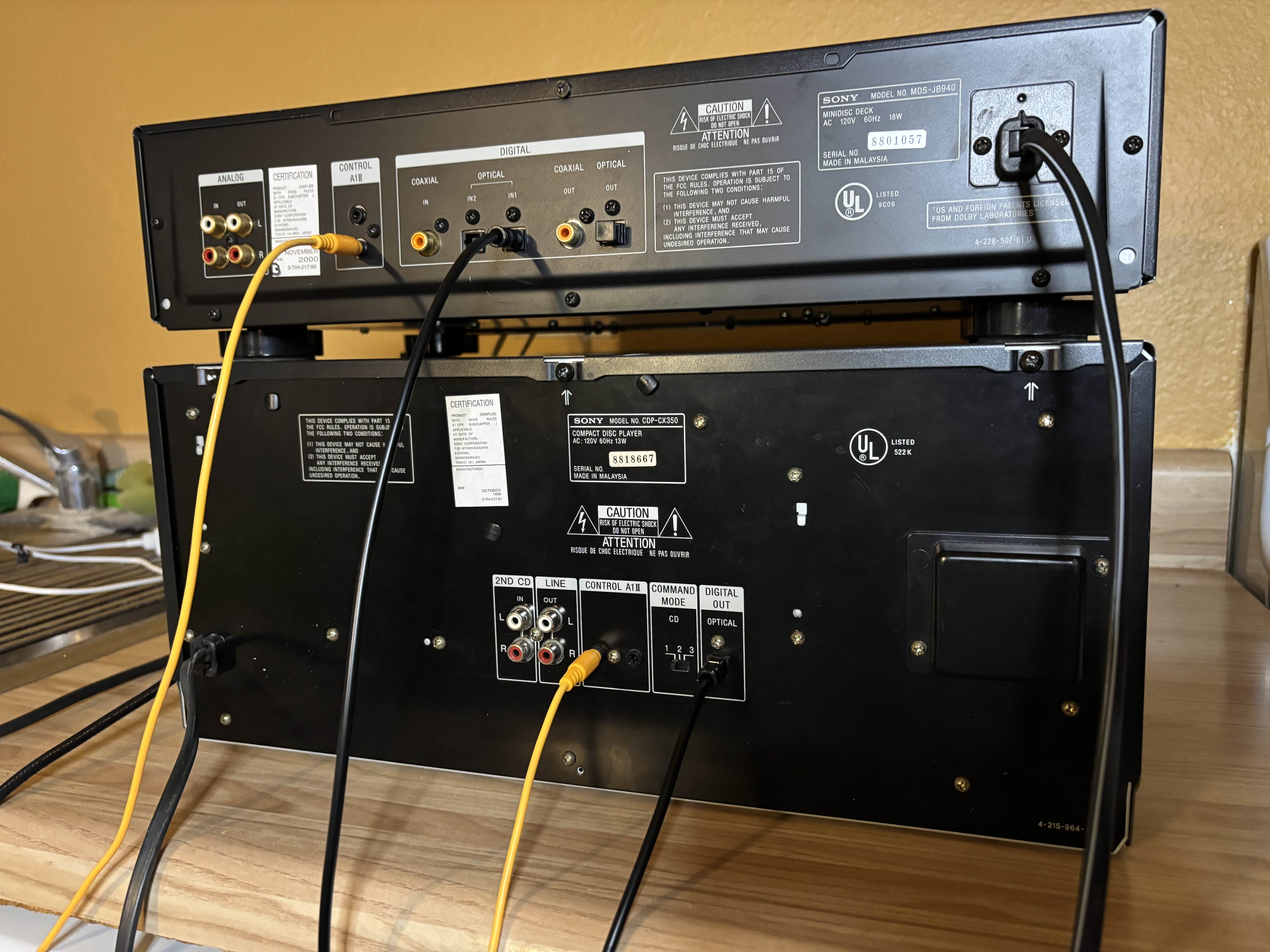
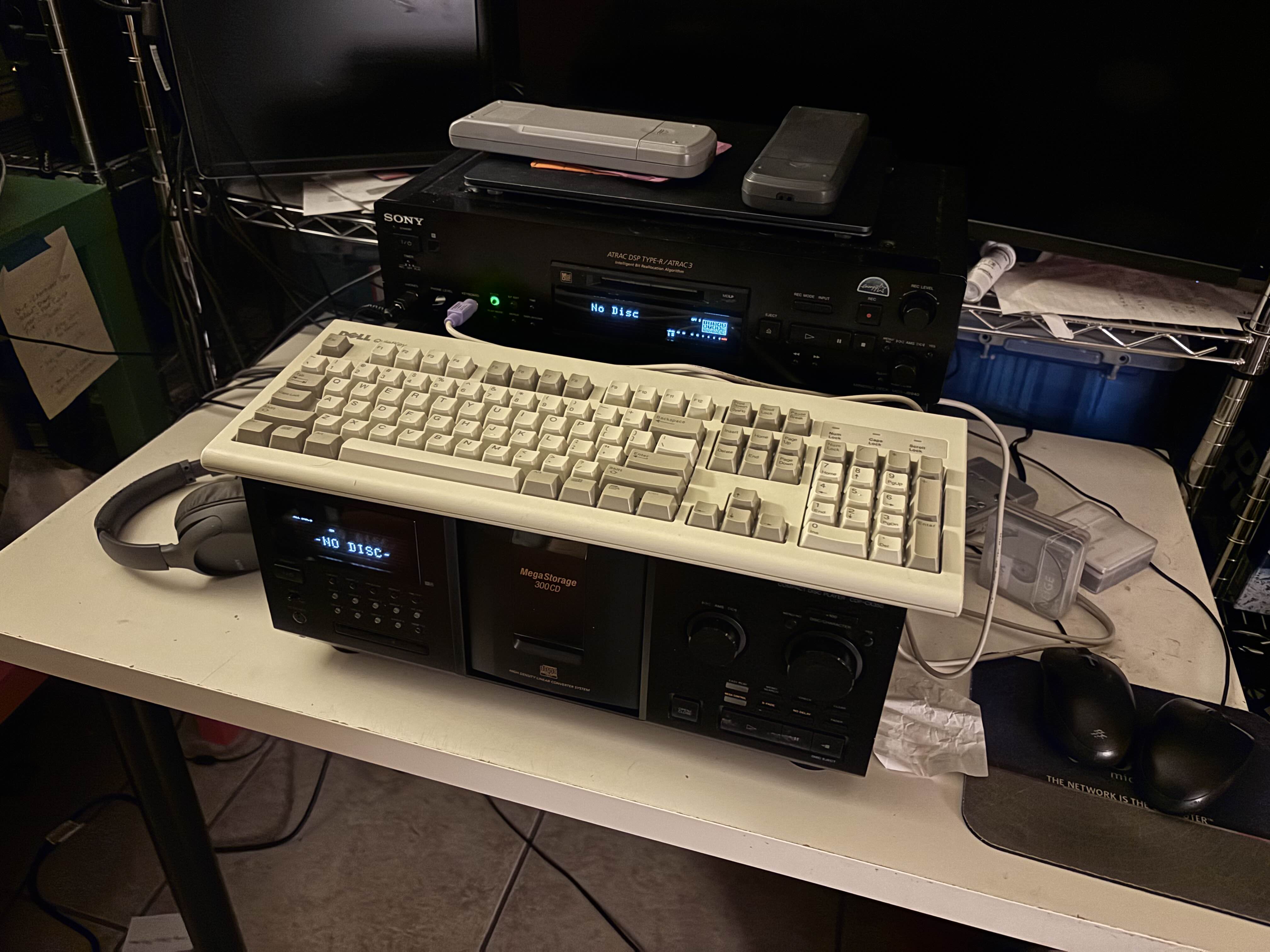
Most, if not all, regional models of the JB940 have a PS/2 computer keyboard and Control A1II. The keyboard can be used to control most of the functions on the deck as well as for entering disc and track titles. A1II can connect to compatible Sony CDP- models to transfer CD-TEXT for automatic track titles, as well as to a PC Link interface for use with computer software.The A1II port also has S-Link, which allows compatible Sony a/v components and TVs to relay IR commands to one-another, so you could have driven the JB940 from behind closed doors, if your TV or receiver's port were visible.
I won't be examining the computer software in detail, but M-Crew allows for controlling the machine from a computer interface, adding/editing titles, doing editing functions such as track moves and splits, coordinated recording from CDs and CD changers, and (new in M-Crew relative to the older software) recording from computer files to MD, before NetMD. (The software and drivers run on Windows 98 and XP and doesn't run or runs poorly in any newer versions.) It's, generally speaking, worth evaluating decks without considering this functionality today, as there is no complete modern software for it. See Laurent Devaud's review of the MDS-PC3 as another example of this.
Although not a "pro" machine per se (and as such there is no firmware variation with control over copyright status) Sony also sold the JB940 in it's pro lineup, likely for any use case where copy status control wouldn't be needed, such as digitizing microphone-recorded minidiscs into a DAW, or recording audio from a DAW out to a minidisc, especially for a radio and broadcast environment.
Compared to the portable machines, Sony continued emphasizing the SP mode and SP-only features (such as scale factor editing, to raise/lower the volume of a track) on it's home decks, especially at the high end, and the JB940 is no exception.
The Moment
The JB940 was introduced in 2000. In Japan, people were mostly still not computerizing their music collections and were also still doing the majority of their recording at home using rented CDs, which meant the focus was often on fast-dubbers and home hifi decks for recording, with most people picking up player-only units for on-the-go listening.
Due to that rental culture, and the large installed base of existing equipment, it seems anecdotally like SP mode was more popular in Japan. (But this will always vary on individual circumstances.) From what I can tell, many people who were using the rent-and-record aspect of MD continued using SP mode, and indeed ultimately skipped NetMD when it launched. Part of this appears to have been that "MD as an alternative to MP3 players" wasn't as big a part of the MD marketing message as elsewhere.
In the US, if you recorded something in an LP mode and it sounds good enough on your headphones, but not good enough on your home hifi: you can just put the CD in your home CD player.
Sony had been selling computer-integrated MD hardware in various contexts since 1997 and 1998. In North America, on the portable side, they sold portables with a digital audio interface as an alternative to MP3 players. The set-top decks offered a little more control, but hadn't up to that point allowed direct computer to MD recording. . So the JB940 would mostly have made sense for people doing CD recording primarily, and people whose recordings were important enough to them to merit listening to on the home stereo.
The Japanese Connection
There's not admittedly an awful lot to say here. The Japanese rent-and-record use case means it makes sense the JB940 (and all decks) would have been a little more popular in Japan than in North America.
The MDS-JB940 shipped globally. Mine is a US-market model, and I'm not aware of any major market that lacked it. Unlike the models below and above it, I'm not off hand aware of any regional variations.
I mentioned above my anecdata-driven guess is that SP remained more popular in Japan due to the whole "the copy you record on an MD is the only copy you have" factor, but MDLP definitely got used.
This is more tenuous in terms of overarching trends but the machine's digital output paired with Japanese copy status manipulators would have been useful for copying discs. I mentioned in my review of the Panasonic SJ-MR230 that it has a title copy function, and one way to get a disc with the same number of tracks that are the same length is to make a direct MD -> MD copy. (But that feature would also work if you'd done a CD - MD copy more than once, say.)
Although if you were using Panasonic hardware anyway, their boomboxes and bookshelf steroes had an analog hole that used the remote port to transfer track markers and titles from a source MD to a destination one.
Why Bother With a Deck?
I'm always saying there's no wrong way to do the hobby or use the format and this applies here. It's totally fine to treat MD like an MP3 player and use portables only. But I also personally think you could be missing out if so.
You can do recording on a portable unit. If you get one with Type-R, you should get identical results to if you use a deck with Type-R. You can get portable units with proper line-level output, at line voltages and with no applied EQ.
With those two functions, you could probably avoid dealing with a deck entirely. At least if your hearing is similar to mine.
Some people say that due to being bigger, decks naturally produce better audio, but I've never found that to be specifically true. To me, on both headphones and external speakers, my MZ-R909 and MZ-R909. (And in fact, if you've ever popped open an MD deck you know that the actual electronics can be quite small, so "bigger is better" only applies to decks where the totality of electronics is bigger than in a portable, which is only some of them.)
Why, then, bother with a deck?
I see a couple reasons:
The most obvious is probably aesthetics and vibes. If you have a home stereo or a stationary space that could have one, a deck may work well. It's a good way to integrate the format into another aspect of your music listening, where the ritual can play out in a little bit of a different way.
The next is convenience and logistics. If you have a deck set up in a stereo, it's easier to insert and remove discs, easier to control it remotely, easier to record CDs (two button touches on the MD remote if you have a Sony CDP), easier to enter track titles with CD-TEXT if you have a compatible player, easier to enter track titles if you deck came with the bit remote or supports PS/2 keyboards, and easier to finely control where track splits happen when editing discs.
Decks also often support multiple inputs and outputs. When the JB940 hangs out with my computer, I can have computer on one optical input, CD on another, DVD on the coaxial input, and then send the audio back into the computer digitally, or connect a portable MD recorder or a PCM field recorder with a digital input if relevant.
One other nice aspect to decks is most of them allow you to use them as a DAC. With no disc inserted, hit "REC" and the machine will enter DAC/ADC mode and pass whatever input is active through to all active/available outputs. This functionality is great if you're pairing an MD machine with a CD changer, say, that has a digital output but where the MD machine obviously has significantly better analog hardware. (Or if, say your 300-disc CD changer or cheap thrift store DVD player doesn't have it's own headphone port.)
I don't really need to have one single machine doing all of those functions, but it's nice to be able to, and I have done them all with the JB940.
If part of your interest in the format is in anything like "intentionality" and returning to a simpler time, it's worth taking some time to explore decks and other stationary equipment as an aspect to the format. This dovetails with my usual, same, take on recording from CDs, I view it as an integral part of the experience, and recommend CDs as an MD user's acquisition format, if part of your goal with MD is to get away from streaming services.
Stand Outs
Two things really stand out, for me, about the JB940.
The first is this specific hardware generation is the last before Sony started cost-cutting and de-contenting, when nearly every change was positive and while things were still overbuilt for its own sake. There's some specific ramifications for different product levels.
The JB940's successor is a cost-cut that removes several of the JB940 and JA333ES's most unique features. It's not a "bad" deck, but unlike how MZ-NE410s and B10s are inexpensive because decontenting and cost-cutting turned them into huge sellers, the JB980 remains one of the most expensive pieces of MD equipment you can buy.
The other is the JB940's specific combination of flexible interfaces and control options. A1II and the keyboard connector together all paired up with the 30-button remote gives you meaningful flexibility to meet the needs of nearly every recording scenario. The only thing it doesn't do is NetMD and you can just do that on a portable, or something cheaper.
I feel comfortable saying the MDS-JB940 is the best overall MD deck for recording.
The JB940 isn't, per se, going to produce better results than a JE440/470, digitally, and if you have average hearing it might not even sound different, but it does net you additional flexibility.
I have mine connected to my computer as described above, with digital ins and out so I can listen to MDs on my computer headphones and listen to
The JB940's analog and power hardware should make it reasonably suitable for recording from analog sources as well, but Sony was less clear on whether the analog input stages were meaningfully improved or if these were all "good enough" and substantially similar.
Recording
If you've read any of my other reviews you probably know I consider recording to be the emotional heart of the format. The ultimate forced slowdown, and with editing and titling, a way to extend that slowdown into subsequent listens of a given disc, whether it's an album or any form of mixtape.
Whether it's a simple CD copy you set-and-forget, a high-effort no-automation copy of your favorite vinyl, something off of a streaming service via your phone or computer, or you've carefully crafted a playlist, the JB940 can record it.
The JB940 is at it's strongest using CDs and a compatible CD player, especially if you burn CDs with CD-TEXT on them.. Using the Control-A1II link, my CDP-CX355 or CDP-A39 can both send CD-TEXT from any disc that has it. I have a few CDs I've burned with CD-TEXT of playlists I make copies of regularly for friends who have MD machines, and doing the copy from a CD has been, even across different recorders, been the best way to get the most consistent results.
If you do record either a CD without TEXT or from your computer, just hit enter during each track and type the name in. It's significantly faster than on any portable or even using the 30-button remote, which is itself probably the next fastest titling experience. You can enter titles using the AMS knob but part of why you spend more for a higher end deck is to not have to.
(As ever, I consider titles to be optional on personal-use discs, but they are nice-to-have for new albums you're learning and for mixtapes you share with friends CD-TEXT is pretty rare, so for pressed albums or if you don't have software that can author CD-TEXT, using the keyboard is that much more important and other than physical size is probably the JB940's most important (if not "sole") improvement over the JA333ES.)
The JB940 also has coax input and output ports, which is "common" on higher end audio equipment, and the cheapest DVD players you can get at Best Buy and Goodwill alike. If you have a JB940 you can use coax to pair it to a cheap DVD player, but most older cheap DVD players also have optical so you don't need to spring for a JB940 purely to get coax.
From a computer, using my Cubilux USB digital sound interface and VLC on Windows, plus pause entries between each track, the deck accurately caught trackmarks. This is very slightly more annoying to set up than just using the MD-PORT DG2, but the DG2 causes my decks to drop a millisecond or so of audio off the start of each track. My portables, such as MZ-R909, can catch those starts fine. None of this is a problem per se, for better or worse different computer, software, interface, and recorder combination often produce slightly different practical results, so if you're looking for this type of setup you may need to experiment a little bit to find what works.. The other main downside to recording from a computer, at least if you attempt any automation, is the loss of gapless recording.
Due to technicalities in how ATRAC encoding works, any stop in the continuous flow of audio produces a very short moment of dead air, a couple milliseconds between tracks.
If you need to record gapless, either use a CD as a source or record with no "automation" on your computer and add in track markers by hand. (And, if you are recording from a phone or tablet you may need to do this anyway, as most cheater auto marking tricks don't work on mobile.) The JB940, as almost all other Sony decks, lets you rehearse each track split and place markers with decent precision. It takes longer than on a portable but if you're paying attention you get better results.
All of the conveniences of entering titles during recording applies to after the fact too. When I had the keyboard connected during my initial drafting on this review, I found myself adding track titles on discs I've already recorded. I don't normally bother but it's such a low-friction experience if I wasn't already doing something and I knew the title, why not?
Playback
After I re-belted my JB940, it sort of just stayed on my desk. I have a hifime UR23 connected to my work computer, which I use to accept a digital input from a minidisc deck or my personal computer. I swapped the cable from my MDS-S500 to the JB940 and, due to it's short depth, it sat comfortably between my keyboard and monitor.
The JB940 has all the modes and features you'd expect out of a consumer deck and arguably then some.
Using it this way is massively under-utilizing the potential of this deck, but it does work well. It's nice to be able to hit the physical buttons or drive it with the IR remote, rather than dig through my computer for software music controls.
The big two-line display is useful for viewing titles and times at the same time. You can generally pick from a few combinations. Disc and track titles at once, track title and a selected time, or a property such as the filter output mode or pitch control setting, combined with either the time or a title. The display text and time buttons let you cycle through modes.
The display also displays kanji text, if you have it.
The Sound
In this sense I'm probably the wrong person to evaluate the JB940. I know, objectively, Sony spent more money building this thing. In 2000 or even 2003 it would easily have justified it's price point to a heavy user of the format with good hearing and a good stereo system.
Today? I have average-at-best hearing and am generally speaking not really sensitive to differences in equipment. I personally can't hear the difference between any of my minidisc hardware.
That's to say: Good Enough.
But if you do have a very good audio system and you do have very good hearing, it would be worth considering the MDS-JB940 as part of your setup, due to it's upgraded analog handling hardware.
The JB940 doesn't have EQ modes like you'd find on a portable device. You're expected to do that with your amplifier if you want it. However, it does have three filter modes. Sony says these "allow you to adjust the tone to match your audio system, listening environment, and the source being played". They adjust the sound on the analog outputs a little bit. One of them is described as softened and smoothed, one is described as fresh and powerful, and the third is described as resonant and mellow. On headphones they make audible-but-minimal changes to the sound, and I haven't had a chance to use the deck with speakers of late. It's a neat little feature to play with.
Pitch control works great, although accessing it is somewhat awkwardly part of the setup menu rather than being it's own control (as on the MZ-B10/100) or it's own button like the filters. You can use pitch control on this machine to slow things down, but not speed them up, so it's great for vibes and bad for transcription or podcasts. Stick to your portable for those, I suppose.
On the portables, Sony renamed and redesigned the speed/pitch control feature from the MDLP/Type-R era into the Type-S era. On Type-R it's called Digital Pitch Control and you can pitch up or down and the speed follows proportionally. The sound is very good. On Type-S, the feature's been re-named to Digital Speed Control and it attempts to maintain the pitch by using a different algorithm to re-speed the audio. The results are a distraction audible "banding" - you could probably ignore if you were doing transcription but the effect is very bad on music. The JB940 uses the better (or a similar, still very good) pitch control method.
Pitch control applies to the analog and digital outputs alike while the filters only apply to analog outputs. But, filters do apply to anything coming in through other inputs as well.
The majority of my play hours on this deck have been using either headphones or digital output. Compared to the lowest end MD decks (300/400 series primarily) I do appreciate the headphone port, as I can use it as a DAC to my computer or a connected CD/DVD player without it's own headphone port. I have used it with the Edifier speakers I use with my TV and it works great with them.
The dual digital outputs means you can do things like connect to external DACs or self-powered speakers with a digital input, connect to a computer digitally, or connect to another recorder. I regularly use my JB940 to record MDs to WAV files. It would also be good for cascading a source out to multiple MD decks. By chaining digital outputs it should be possible to copy a CD onto several MDs at once. (Although the pro decks may have some better functionality for that.)
Comparables
The JB940 is in a unique spot. The models above and below it lose some functionality in some markets, and it's successor is cost-reduced. It's one of the most flexible overall machine, featuring almost every extant option except for 4x fast-dubbing and some connectivity found only on pro machines.
The JA333ES above has upgrades to analog handling hardware as well as the visually distinctive tray loading mechanism, but loses the PS/2 keyboard port, and loses the A1II connectivity if you buy from Japan. The JE640/770 below has more basic analog hardware and lose out on some of the more advanced features, such as timestamping and filters.
The real place where the JB940 shines is in comparison to it's successor. The MDS-JB980 adds: Type-S, groups, and NetMD (it's the slowest overall extant NetMD burner) and removes:
- A1II for integration with CD players and other components
- real-time clock for timestamping
- swap from Sony-custom DAC to a commercial-off-the-shelf DAC, co-convened with the ADC
- second toslink input and only coax output
- filter mode for analog outputs
- 24-bit output mode on digital outputs
- 30-button remote is swapped for 9-button remote (but it might still work with the 30-button remote and it retains both NetMD and the keyboard port for titling)
Whether those things "matter" depends. I'm sure the JB980's internal DAC still sounds good, or else Sony wouldn't have put the "QS" designation on it, and it still has msot of the other power and analog hardware from the JB920, 930, and 940, and you can still use any external DAC. If JB980s were cheap I probably wouldn't mention it, but JB980s on average cost meaningfully more than the JB940. (There are deals but on average.)
I'm aware it rings hollow for me to say the JB980's audio hardware is a downgrade from the JB940. I have professed to not be able to hear the difference between the JB940 and, say, the MDS-S500, which should have the same DAC as the JB980. If you can find a JB980 for less than a JB940 and are sure you won't need any of the JB940's fun extras, have at, but it feels like a bad deal as most JB980s go for over $500 when JB940s are hanging around for $300. (The other main downgrade, for me, is "everything else" - I love timestamped recordings and A1II, and find the multiple inputs of the JB940 to be useful for reording.
Comparing the JB940 to it's predecessor (MDS-JB930) the main change is MDLP. If you don't need MDLP, the JB930 is nearly every bit as good as the JB940 and everything else I've written here still applies.
For basic use cases, you can easily go to a newer or a lower end deck and, realistically, not lose much. I even fully believe the 300/400-series decks, are significantly overlooked as options for both recording and playback. If you want something to pair with a cheap DVD player for recording and to put your mixtapes on your TV speakers, a low end deck will still do great.
The other main comparable I see at the high end is the pro decks. The TASCAM MD-350 springs to mind first as having dual digitlal inputs, digital outputs, balanced and unbalanced analog i/o, and a keyboard input in a 2u form factor. I often compare the MD350 to the MDS-JE640, but others claim it's analaog hardware is exceptional and it does have balanced analog i/o, setting it apart from all of Sony's consumer decks.
The MDS-E10 and E12 are Sony's MDLP-era pro decks. They share the same chipset and mechanism with all of the Type-R MDLP decks and also add balanced analog i/o. The E10/12 have some differentiation in terms of features designed with "pro" and broadcast environments in mind, including things like multi-deck relay playback/recording. Everyone who has one of these loves it, They would go great if you've got the ecosystem for them but I don't usually recommend them as a starting point because toslink, the more common consumer standard, is sometimes swapped for coax. (But this is another area where "the cheapest DVD player you can imagine" comes into play.)
Conclusion
The JB940 is a great overall machine. It's not the absolute top-end machine, but it's close and the features it retains over the MDS-JA333ES make it a better computer desk deck or better for integration into a recording-oriented setup. The only things it doesn't have are balanced and NetMD.
It technically has "computer integration" connectivity but this involves software with drivers that don't run on modern computers. You could argue in favor of one of the NetMD decks and they are fine for this, but the JB940's flexibility at everything else and retention of features that don't carry into NetMD such as the real-time-clock sell it for me personally. (If you needed to do anything NetMD is bad at, such as managing a CD/MD dub to get gapless or recording off of streaming or high-resolution files, you'd need to manage and run the deck directly anyway, so NetMD is incomplete-at-best integration here.)
Ironically, it's the MDS-S500 my JB980 displaced when I put the new belt in and started using it. It's shallow build means it sits behind my keyboard and in front of my monitor with no real problem in space I wasn't using anyway. There's just barely enough room to leave a DVD player hanging out as well.
If you need a recording deck and you're interested in either having every possible recording feature or high end analog handling hardware, check out the JB940.
*Editor's Note - I must admit I've never seen this word before, but I haven't seen everything and don't think I will....